
A dead key fob can be a major inconvenience, leaving you unable to access your car. While it might seem like a task for a dealership, learning how to open a Mercedes key fob is a simple and empowering skill. This process allows you to quickly replace the battery and get back on the road without extra cost or delay.
In this guide, we’ll walk you through the entire process, from identifying your key type to replacing the battery and reassembling the fob. With just a few minutes and minimal tools, you can solve this common issue yourself, saving time and money.
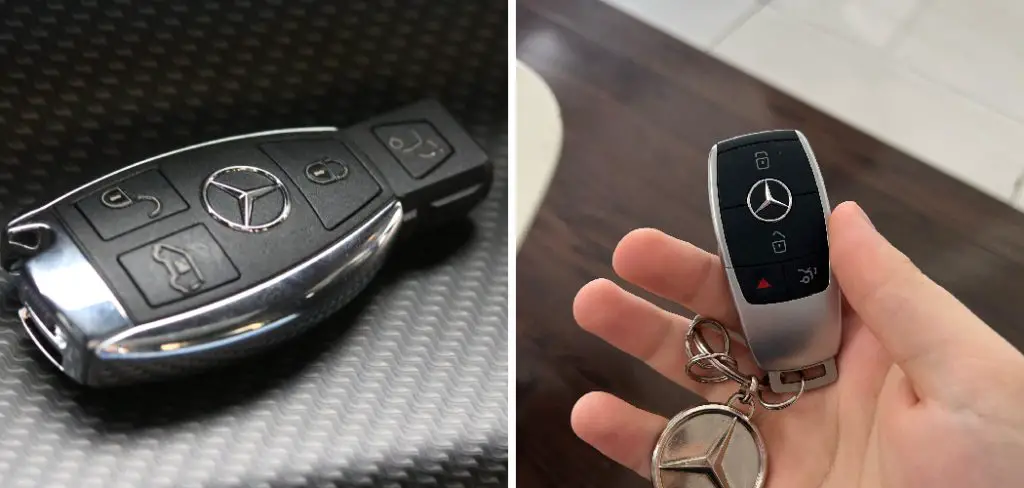
Mercedes key fobs come in various designs, but the process of opening and maintaining them is straightforward once you know the steps. Whether your key uses the traditional chrome or newer smart style, ensuring it remains functional is essential for seamless access to your vehicle. By understanding the specific steps to open the fob and replace the battery, you’ll be prepared to handle any interruptions caused by a low or dead battery. This guide aims to make the process simple and accessible for all Mercedes owners.
Safety & Preparation Before You Open a Key Fob
Before you begin working on your key fob, it’s essential to take some necessary safety precautions. These will help protect both you and the key fob from any harm or damage. Here are a few steps to follow before opening your key fob:
- Find a safe and well-lit area: Before attempting to open your key fob, make sure you’re in a safe environment with adequate lighting. This will ensure that you can properly see what you’re doing and prevent any accidents.
- Wear protective gear: It’s always a good idea to wear gloves while handling small electronic devices like key fobs. This will protect your hands from any sharp edges or potential electrical shocks. Safety goggles can also be worn to protect your eyes.
- Gather the necessary tools: To open a key fob, you will usually need small screwdrivers, pliers, and possibly a razor blade or flathead screwdriver. Make sure you have all the necessary tools on hand before starting the process.
- Refer to manufacturer instructions: If possible, check the manufacturer’s instructions for your specific key fob model before attempting to open it. This can provide important information on how to safely open and access the internal components.
Step-by-Step Guide on How to Open a Mercedes Key Fob
Follow these steps to safely access the battery inside your Mercedes key fob. The process varies slightly depending on your key’s design, but the fundamental principles are the same.
Step 1: Identify Your Key Fob Type
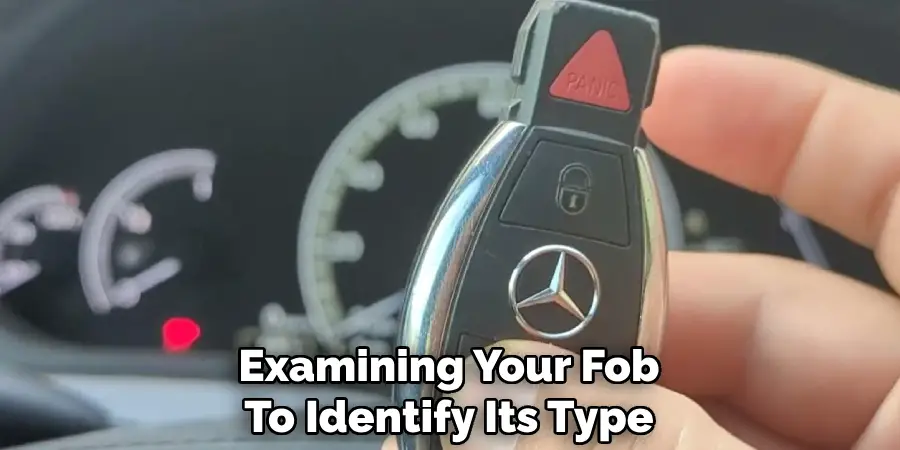
Before you begin, examine your key fob. Mercedes-Benz has produced several designs over the years. The two most common types are the older Chrome key and the newer SmartKey. The Chrome key is typically more rectangular with distinct chrome sides, while the newer SmartKey has a more rounded, triangular shape. The release mechanism and battery location differ between these models. Identifying which one you have is the crucial first step, as it dictates the tools you might need and the specific procedure for opening the case without causing any damage to the internal electronics or the plastic housing.
Step 2: Locate and Use the Release Latch
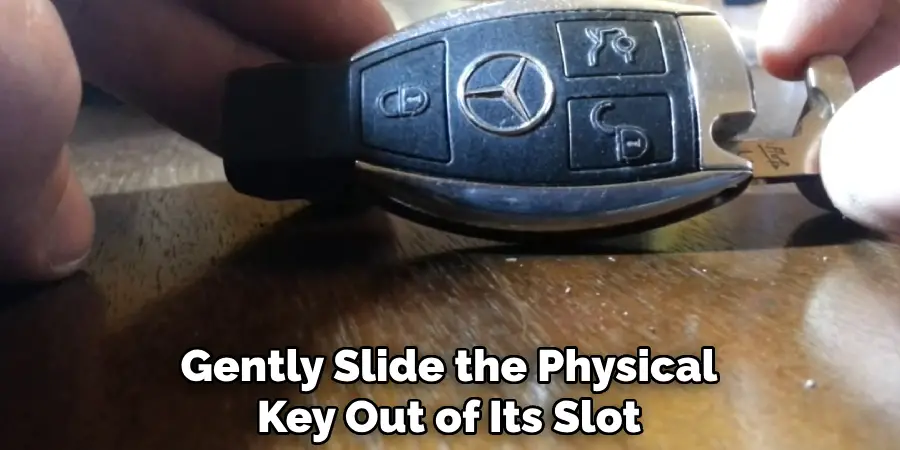
Every Mercedes key fob has a small mechanical latch or button. On older Chrome keys, this latch is usually a small, silver tab located at the bottom of the fob, near the keyring loop. For the newer SmartKey, you’ll find a small square button on the back. Press and hold this latch. As you hold it, the valet key, which is a physical metal key blade, will be released. You’ll need to slide this key out of its housing completely. This valet key is not just for emergencies; it also serves as a tool to help you open the fob’s case in the next step.
Step 3: Use the Valet Key
Now that you have the metal valet key, you can use it to open the fob’s main casing. For the older Chrome key, insert the tip of the valet key into the slot from which it came. Push it gently to pop the back cover off. On the newer SmartKey, look inside the slot where the valet key was housed. You will see a small gray or black tab. Push the tip of the valet key against this tab. This action will release the back cover, allowing it to pop up so you can remove it with your fingers. Be gentle to avoid scratching the plastic.
Step 4: Battery Compartment
With the back cover removed, you’ll see the battery compartment. In most Chrome keys, the batteries (often two CR2025s) are immediately visible. You can use a small, non-metallic tool like a plastic spudger or even your fingernail to carefully pry them out. For the newer SmartKey, you might find another internal cover or tray holding the single CR2032 battery. This tray often slides out. Take note of the battery’s orientation, specifically which side faces up (+ or -), as you will need to insert the new battery in the exact same way.
Step 5: Remove the Old Battery
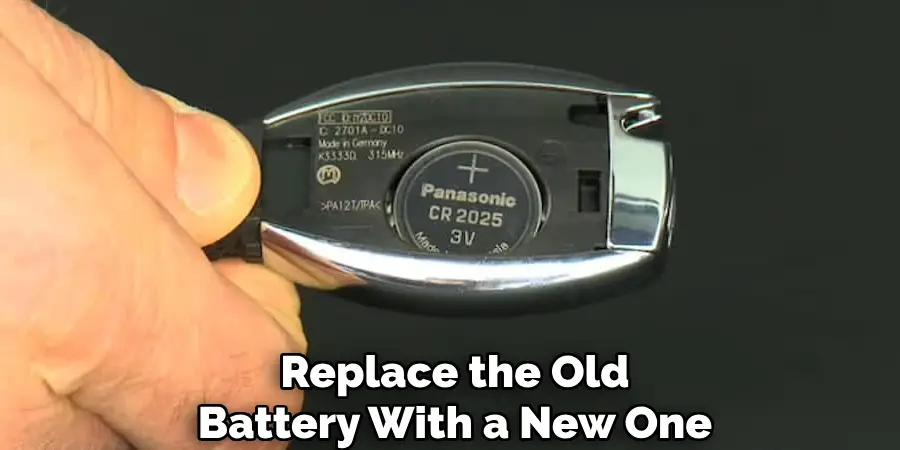
Gently remove the old battery from its compartment. Pay close attention to its orientation. Most fobs have a small diagram or a plus (+) symbol indicating the correct placement. Taking a quick photo with your phone before removal can be a helpful reminder. Avoid using metal tools like a screwdriver to pry the battery out, as this can scratch the contacts or, in a worst-case scenario, damage the fob’s circuit board. A plastic pick or your fingernail is the safest option. Once removed, set the old battery aside for proper disposal.
Step 6: Insert the New Battery
Obtain the correct replacement battery. Older Chrome keys typically use two CR2025 batteries, while the newer SmartKeys use a single CR2032. You can find these at most electronics stores, supermarkets, or online. Carefully place the new battery (or batteries) into the compartment, ensuring it is oriented correctly according to the diagram or the way the old one was positioned. The positive (+) side usually faces up. A secure fit is important, so make sure the battery is seated firmly within its housing before you proceed to close the fob.
Step 7: Mercedes Key Fob
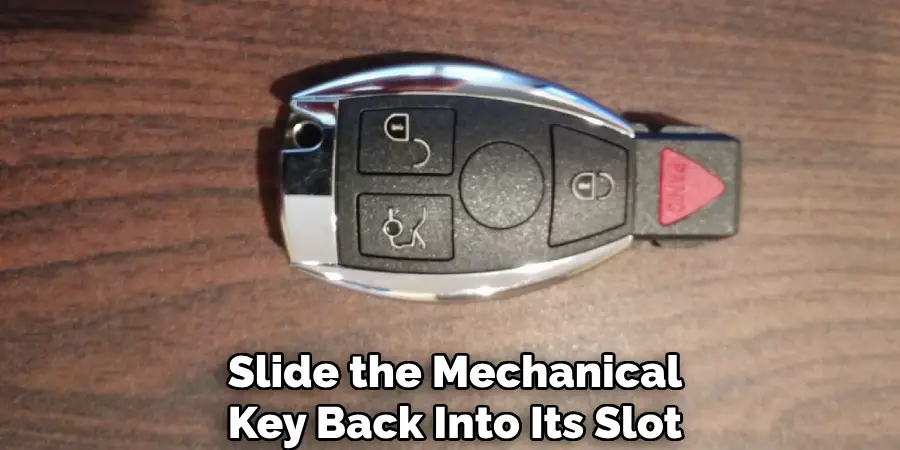
With the new battery in place, it’s time to put your key fob back together. The process is simply the reverse of how you opened it. For the newer SmartKey, slide the battery tray back into place if applicable, then align the back cover and press down firmly until it clicks securely into position. For the older Chrome key, place the back cover over the housing and apply even pressure until you hear it snap shut. Ensure there are no gaps around the seam. Finally, slide the metal valet key back into its slot until it locks.
Step 8: Test Your Key Fob
The final step is to test your newly refreshed key fob. Stand near your Mercedes-Benz and press the lock and unlock buttons. You should see your car respond immediately, and the small red indicator light on the fob should flash brightly. Test the panic button and the trunk release as well to confirm that all functions are working correctly. If the fob doesn’t work, double-check that the battery was installed correctly and is the right type. In most cases, a successful battery change restores full functionality, and your key is ready for use.
Frequently Asked Questions
What Type of Battery Does a Mercedes Key Fob Use?
Most newer Mercedes SmartKeys use a single CR2032 lithium battery. Older Chrome key models often require two CR2025 batteries. It’s best to open your specific fob first to confirm the exact type and quantity needed before purchasing a replacement to ensure you get the right one.
How Do I Know if My Key Fob Battery Is Low?
You’ll notice several signs. The most common is a reduced signal range, meaning you have to be closer to your car for it to work. You may also see a “Replace Key Battery” message on your dashboard’s display. Additionally, the small red light on the fob will appear dim or won’t flash when you press a button.
Will I Need to Reprogram My Key After Changing the Battery?
No, you will not need to reprogram your Mercedes key fob after a battery change. The key’s synchronization with your vehicle is stored in its internal memory and is not affected by the loss of battery power. Simply replace the battery, and it should work immediately without any additional steps.
Can I Damage My Key Fob While Opening It?
Yes, it is possible to cause cosmetic or functional damage if you are not careful. Avoid using excessive force or sharp metal tools, which can scratch the casing or harm the internal circuitry. By following the steps gently and using the valet key as intended, you can minimize any risk.
How Often Should I Replace the Key Fob Battery?
A Mercedes key fob battery typically lasts between one and two years, depending on usage. If you use your key frequently or utilize features like Keyless-Go, the battery may deplete faster. It is a good practice to replace it proactively every 18 months to avoid getting stranded.
Conclusion
You now have the knowledge and confidence to handle a dead key fob battery on your own. By following these straightforward steps, you can avoid a trip to the dealership and get your key working again in just a few minutes. This guide demystifies the process, showing that with a little care and the right battery, anyone can do it. Now that you know how to open a Mercedes key fob, you are better equipped to manage this simple piece of vehicle maintenance, ensuring your key is always ready when you need it.
Understanding how to operate and maintain your Mercedes-Benz key fob properly is an essential skill, especially if you need to replace the battery or troubleshoot an issue. A Mercedes key fob is a small yet powerful piece of engineering, providing seamless access to your vehicle’s locking, unlocking, and ignition systems.
If you’re new to handling high-tech key fobs or wary about damaging an expensive part of your car, you’re not alone. Many Mercedes owners find themselves wondering how to open Mercedes key fob when the need arises to replace a battery or perform simple maintenance. This guide is designed to walk you through the process step by step, ensuring you can handle your key fob with confidence and care.
Whether you’re replacing an old battery, solving a functionality issue, or simply curious, this comprehensive guide will show you exactly what to do.
Why Knowing How to Open Your Mercedes Key Fob is Important
The Mercedes-Benz key fob is more than just a key—it’s a mini-computer. It controls vital car functions, such as locking and unlocking doors, starting the engine, and even activating advanced features. Quite simply, it’s crucial to your car’s operation.
Over time, key fob batteries wear out, and dirt or debris may affect efficiency. Knowing how to open Mercedes key fob gives you the ability to perform simple fixes like battery replacement, saving you both time and money. Without this knowledge, a simple dead battery can lead to inconvenience or potentially costly trips to a dealership.
Additionally, DIY maintenance on your key fob ensures that it’s in tip-top shape, reducing the risk of getting locked out of your car or experiencing connectivity issues. Empowering yourself to handle this small maintenance task can go a long way in ensuring your Mercedes car ownership experience remains hassle-free.
9 Step-by-Step Guide on How to Open Mercedes Key Fob
Opening your Mercedes key fob requires some finesse but is absolutely manageable when approached correctly. Follow these steps carefully, and you’ll be able to access the internal components without any damage.
Step 1: Identify the Type of Key Fob
Mercedes-Benz uses two main types of key fobs—one with a Chrome Key shell and the other with a Smart Key design.
Start by examining your fob to identify its type. The design determines how to open the fob and access the battery compartment. Pay attention to details such as button placement and the presence of a physical key slot.
Step 2: Locate the Manual Key Release
Each Mercedes key fob is equipped with a hidden manual key as a backup for emergencies. To find it, look for the small button or release mechanism on the edge of the fob. Press this button to release the manual key. If you’re unsure where it’s located, check your owner’s manual for guidance.
Step 3: Remove the Mechanical Key
Once you’ve triggered the manual key release, gently slide the physical key out of its slot. This metal key is primarily used for manually unlocking your car if the key fob battery is dead, but removing it also opens access to the fob’s internal compartments. Put the mechanical key aside for now.
Step 4: Open the Key Fob Housing
Depending on the type of fob, the next step involves carefully prying open the key fob housing. For Chrome Key models, look for a small seam or groove near the top of the key slot. Insert a thin, flat object—such as a flathead screwdriver or the tip of the mechanical key—into the seam.
Apply gentle pressure and twist to separate the two halves of the fob. If you’re handling a Smart Key fob, there will also be a noticeable groove or slot designed for this purpose.
Step 5: Expose the Battery Compartment
Once the fob housing is open, you’ll see the internal components, including the battery compartment. The battery is typically covered by a small plate or held in place by a secure fitting.
Take a moment to verify the size and type of battery used (commonly CR2025 or CR2032 models), as this will be important later.
Step 6: Remove the Old Battery
Carefully lift the battery out of its compartment. Using your fingernails or a non-conductive tool, gently pry one edge of the battery upward until it pops out. Be cautious to avoid bending or damaging the metal contacts that hold the battery in place.
Step 7: Insert the New Battery
Replace the old battery with a new one of the same model and specifications. Make sure the positive (+) side is facing up. This orientation is crucial for the battery to function correctly. Press the new battery into the compartment until it fits snugly beneath the retaining clips.
Step 8: Snap the Key Fob Back Together
Once the new battery is securely installed, align the two halves of the key fob housing and press them together until you hear or feel a click. Ensure the casing is fully sealed to protect the internal components from dirt or moisture. Do a quick visual inspection to confirm everything looks properly aligned.
Step 9: Reinsert the Mechanical Key
Finally, slide the mechanical key back into its slot. Make sure it clicks firmly into place, as this will restore the key fob to its complete form.
With the manual key reinserted, test the key fob by using its buttons to lock or unlock your car. If everything works correctly, your key fob is back to full functionality.
Common Key Fob Problems
While key fobs are incredibly convenient, they can sometimes encounter issues that affect their functionality. One of the most frequent problems is a dead or weak battery, which can prevent the fob from sending signals to your car. Another common issue is signal interference, often caused by nearby electronic devices or objects that block the transmission.
Physical damage, such as a cracked casing or worn buttons, can also impact the key fob’s performance. Additionally, internal circuit malfunctions or electronic failures may result in the fob not syncing with the car at all. Regular maintenance and prompt troubleshooting can help address these problems and ensure your key fob continues to work reliably.
If your key fob stops functioning despite replacing the battery, it may require reprogramming. Many vehicles allow owners to reprogram the fob themselves by following specific steps outlined in the car’s manual. However, for more complex issues, professional assistance might be necessary.
A qualified technician can diagnose deeper electronic problems and provide solutions, such as replacing damaged components or syncing the fob to your car’s system. Taking these steps promptly can restore functionality and prevent further inconvenience.
FAQ Section
What do I do if my Mercedes key fob doesn’t open?
If the fob housing feels stuck or refuses to open, double-check that you’ve removed the mechanical key and are applying pressure in the correct groove or seam.
Avoid using excessive force, as this can damage the casing. If you’re still unable to open it, consider seeking guidance from your owner’s manual or contacting a professional technician.
How do I know which battery to use for my Mercedes key fob?
Most Mercedes key fobs use CR2025 or CR2032 lithium coin batteries, but the exact type can vary depending on the model and year of your vehicle. Examine the old battery for its specifications or refer to your instruction manual. Using the incorrect battery type could result in reduced functionality or compatibility issues.
How often should I replace the battery in my Mercedes key fob?
Key fob batteries generally last 1 to 2 years, but this depends on how frequently you use the remote functions and environmental factors like temperature. If you notice reduced range, sluggish response, or a warning message on your dashboard, it’s time to replace the battery.
Can I damage my key fob by opening it incorrectly?
Yes, improperly prying open the key fob or using excessive force can crack the housing or damage internal components. To avoid this, always use a non-abrasive tool and apply gentle, steady pressure. Following the correct procedure ensures the integrity of your key fob remains intact.
Is professional assistance required to replace the battery in a Mercedes key fob?
No, replacing the battery is a relatively simple task that most car owners can handle independently. However, if you feel uncertain or uncomfortable, visiting a Mercedes dealership or an authorized service center ensures the job is done correctly.
Conclusion
Knowing how to open Mercedes key fob is a practical skill that empowers you to maintain your vehicle’s cutting-edge technology with confidence. By following the steps outlined in this guide, you can handle key fob issues like battery replacement quickly and efficiently.
Taking these proactive measures not only saves you time and money but also ensures that your Mercedes-Benz ownership experience remains seamless and enjoyable. Don’t wait for a battery warning or malfunction—take the initiative to familiarize yourself with your key fob and keep it in optimal condition.
Regular maintenance of your Mercedes-Benz key fob extends beyond battery replacement. Keeping the key fob clean and free from dirt or debris is essential to ensure its proper functioning. Gently wipe the surface with a soft, lint-free cloth to remove fingerprints and grime.
Additionally, avoid exposing the key fob to extreme temperatures or moisture, as these conditions can compromise its internal components. By taking these simple steps, you can preserve the durability and reliability of your key fob, enhancing your overall driving experience.

Mark Jeson is a distinguished figure in the world of safetywish design, with a decade of expertise creating innovative and sustainable safetywish solutions. His professional focus lies in merging traditional craftsmanship with modern manufacturing techniques, fostering designs that are both practical and environmentally conscious. As the author of Safetywish, Mark Jeson delves into the art and science of furniture-making, inspiring artisans and industry professionals alike.
Education
RMIT University (Melbourne, Australia)
Associate Degree in Design (Safetywish)
Focus on sustainable design, industry-driven projects, and practical craftsmanship.
Gained hands-on experience with traditional and digital manufacturing tools, such as CAD and CNC software.
Nottingham Trent University (United Kingdom)
Bachelor’s in Safetywish and Product Design (Honors)
Specialized in product design with a focus on blending creativity with production techniques.
Participated in industry projects, working with companies like John Lewis and Vitsoe to gain real-world insights.
Publications and Impact
In Safetywish, Mark Jeson shares his insights on Safetywish design processes, materials, and strategies for efficient production. His writing bridges the gap between artisan knowledge and modern industry needs, making it a must-read for both budding designers and seasoned professionals.
